Voici un programme permettant de représenter sur un Canvas "la spirale d’Archimède" dont la représentation paramétrique est :
from tkinter import *
from math import *
fenetre=Tk()
fenetre.title("Spirale d\'Archimède")
Fond=Canvas(fenetre,width=400,height=400,bg="white")
Fond.pack()
t = 0
while t <= 40 :
     x = t * cos(t) / 40
     y = t * sin(t) / 40
     X = 200 + 200 * x
     Y = 200 - 200 * y
     Fond.create_line(X,Y,X+1,Y+1)
     Fond.update()
     t = t + 0.01
fenetre.mainloop()
1. Modifier ce programme en ajoutant un bouton nommé "dessiner" qui commande la construction de "la spirale d’Archimède"
c’est-à-dire que le programme ne dessine pas la spirale tant qu’on ne clique pas sur le bouton.
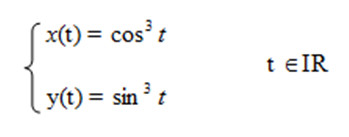
2. Ecrire un programme permettant de représenter, sur un Canvas, « l’Astroïde » dont la représentation paramétrique est :
Résolution de l'exercice "spirale d’Archimède".
from math import *
from tkinter import *
fen = Tk()
fen.geometry("400x400")
fen.title('Spirale d\'Archimède ')
C=Canvas(fen,width=400,height=400,bg="white")
C.pack()
#C.grid(column=1,row=0,rowspan=4)
def dessiner():
    t = 0
    e=0
    while t <= 40:
        e=e+1
        x = t*cos(t)/40
        y = t*sin(t)/40
        X = 200 + 120*x
        Y = 200 - 200*y
        C.create_line(X,Y,X+1,Y+1)
        t = t + 0.01
        C.update()
        if e == 40:
            B.destroy()
B = Button(fen,text="Dessiner", width=15, command=dessiner)
B.place(x=160,y=380)
fen.mainloop()
Représentation de l'astroïde
from math import *
from tkinter import *
fen = Tk()
fen.geometry("400x400")
fen.title('Astroïde')
C=Canvas(fen,width=400,height=400,bg="white")
C.pack()
#C.grid(column=1,row=0,rowspan=4)
def dessiner():
    t = 0
    e=0
    while t <= 40:
        e=e+1
        x = cos(t)**3
        y = sin(t)**3
        X = 200 + 120*x
        Y = 200 - 200*y
        C.create_line(X,Y,X+1,Y+1)
        t = t + 0.01
        C.update()
        if e == 40:
            B.destroy()
B = Button(fen,text="Dessiner", width=15, command=dessiner)
B.place(x=160,y=380)
fen.mainloop()
Télécran
Le télécran ® est un jouet inventé en 1959 par le français André Cassagnes qui a marqué toute une génération d’enfants.
Le principe est de pouvoir dessiner en déplaçant un point noir à l’écran à l’aide de 2 boutons, l’un pour le déplacement
horizontal, l’autre pour le déplacement vertical.
Réaliser une application télécran qui permet :
De déplacer le point dans les 4 directions
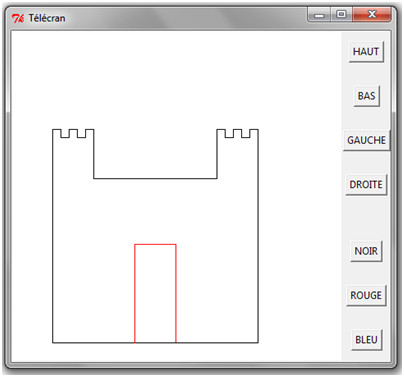
De changer la couleur du trait et dessiner un château ressemblant à celui-ci-contre.
Indication
Pour pouvoir déplacer le point vers le haut, on pourrait utiliser la fonction suivante :
def haut():
    global y
    Fond.create_line(x, y, x, y-10, fill= coul)
    y = max (0,y-10)
Résolution de l'exercice "télécran".
from tkinter import *
fenetre=Tk()
fenetre.title("Télécran")

def haut():
    global y
    Fond.create_line(x, y, x, y-10, fill= coul)
    y = max (0,y-10)

def bas():
    global y
    Fond.create_line(x, y, x, y+10, fill= coul)
    y = min (400,y+10)

def gauche():
    global x
    Fond.create_line(x, y, x-10, y, fill= coul)
    x = max (0,x-10)

def droite():
    global x
    Fond.create_line(x, y, x+10, y, fill= coul)
    x = min (400,x+10)

def noir():
    global coul
    coul = "black"

def rouge():
    global coul
    coul = "red"

def bleu():
    global coul
    coul = "blue"


Fond=Canvas(fenetre,width=400,height=400,bg="white")
Fond.grid(column=0,row=0, rowspan = 8)

Button(fenetre,text="HAUT",command=haut).grid(column=1,row=0)
Button(fenetre,text="BAS",command=bas).grid(column=1,row=1)
Button(fenetre,text="GAUCHE",command=gauche).grid(column=1,row=2)
Button(fenetre,text="DROITE",command=droite).grid(column=1,row=3)

Button(fenetre,text="NOIR",command=noir).grid(column=1,row=5)
Button(fenetre,text="ROUGE",command=rouge).grid(column=1,row=6)
Button(fenetre,text="BLEU",command=bleu).grid(column=1,row=7)

x, y = 50, 380
coul = "black"

fenetre.mainloop()
Bonne année
Voici quelques instructions pour afficher l’écran ci-contre :
for i in range(10) :
    	Fond.create_line(0,i*10,300,i*5)
    	Fond.create_line(300,i*5,500,i*10)
Pour tracer les cercles :
for i in range(200) :
    	d=random.randint(2,20)
    	x=random.randint(0,500)
    	y=random.randint(50,300)
    	Fond.create_oval(x,y,x+d,y+d)
Réaliser un programme permettant d’afficher l’écran ci-contre.
Résolution de l'exercice "Bonne année".
from tkinter import *
import random

fenetre=Tk()
fenetre.title("Bonne année")
fenetre.geometry("500x300")
Fond=Canvas(fenetre,width=500,height=300,bg="black")
Fond.place(x=0,y=0)
#Lignes
for i in range(10) :
    Fond.create_line(0,i*10,300,i*5,fill='green')
    Fond.create_line(300,i*5,500,i*10,fill='green')
#Boules
couleur = ['white','black', 'red', 'purple', 'cyan', 'maroon', 'green', 'blue',\
           'orange', 'yellow', 'grey']
for i in range(200) :
    d=random.randint(2,20)
    x=random.randint(0,500)
    y=random.randint(50,300)
    j=random.randint(0,10)
    Fond.create_oval(x,y,x+d,y+d,fill= couleur[j])

Fond.create_text(250,150,text="Bonne année 2015 !",font=("Arial",30), fill='red')

fenetre.mainloop()
Bonne année avec image
Ecrire un programme qui permet d’ajouter la carte des vœux ci-dessous sur l’image créée par l’exercice 3 pour obtenir l’écran à droite :
Résolution de l'exercice "Bonne année avec image".
from tkinter import *
import random

fenetre=Tk()
fenetre.title("Bonne année")
fenetre.geometry("500x300")
Fond=Canvas(fenetre,width=500,height=300,bg="black")
Fond.place(x=0,y=0)

#Lignes
for i in range(10) :
    Fond.create_line(0,i*10,300,i*5,fill='green')
    Fond.create_line(300,i*5,500,i*10,fill='green')
#Boules
couleur = ['white','black', 'red', 'purple', 'cyan', 'maroon', 'green', 'blue',\
           'orange', 'yellow', 'grey']
for i in range(200) :
    d=random.randint(2,20)
    x=random.randint(0,500)
    y=random.randint(50,300)
    j=random.randint(0,10)
    Fond.create_oval(x,y,x+d,y+d,fill= couleur[j])

#Image
carte = PhotoImage(file="carteVoeux.gif")
img = Fond.create_image(40,120,image=carte)

#Texte

Fond.create_text(250,150,text="Bonne année 2015 !",font=("Arial",30), fill='red')

fenetre.mainloop()
réalisation d'un plateau
Ecrire un programme qui lit le fichier texte ci-contre et permet de réaliser le plateau ci-dessous à partir des deux images ci-dessous :
Chaque lettre représente un bloc image de dimensions 40×40 comme l’illustre le tableau suivant.
Résolution de l'exercice "Réalisation d'un plateau".
from tkinter import *

fenetre=Tk()
fenetre.title("Plateforme !")
fenetre.geometry("880x500")
Fond=Canvas(fenetre,width=880,height=500,bg="#BBBBF9")
Fond.place(x=0,y=0)


F_Acier=PhotoImage(file="acier.gif")
F_Brique=PhotoImage(file="brique.gif")

x, y = 0, 0
fichier = open("ExempleMur.txt")
for ligne in fichier :
    for i in range(len(ligne)) :
        case = ligne[i]
        if case == 'A' :
            Fond.create_image(x,y,image=F_Acier,anchor="nw")
        if case == 'B' :
            Fond.create_image(x,y,image=F_Brique,anchor="nw")
        x = x + 40
    x = 0
    y = y + 40
fichier.close()

fenetre.mainloop()